📱⇄💻 PhoneDrop
Phone ⇄ computer file transfer over your own Wi-Fi.
Run one file on the computer, scan a QR code on the phone. Nothing to install on the phone, no server in the middle.
Open source (MIT) · free · one Python file, zero dependencies · Windows / macOS / Linux on the computer, any phone with a browser
Version 1.0.0 · 2026-10-21 · exe 8.6 MB · SHA-256 913b3b9aaca9275bf7a925fc2869fe5108a2cdf4d406ca728f2370545fc3e6ac
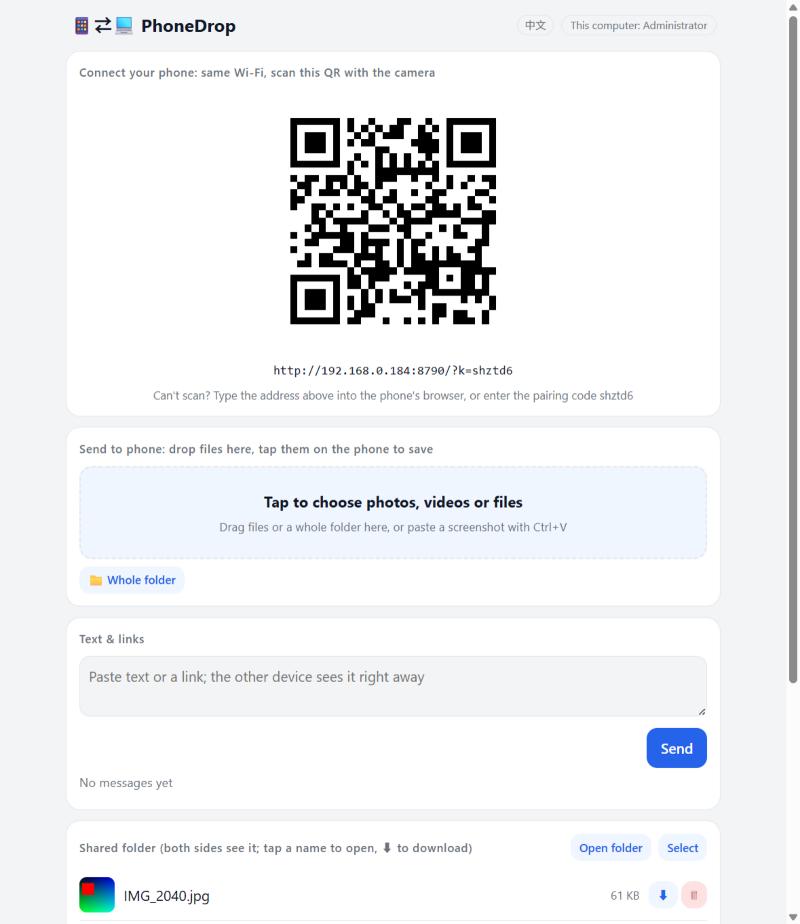
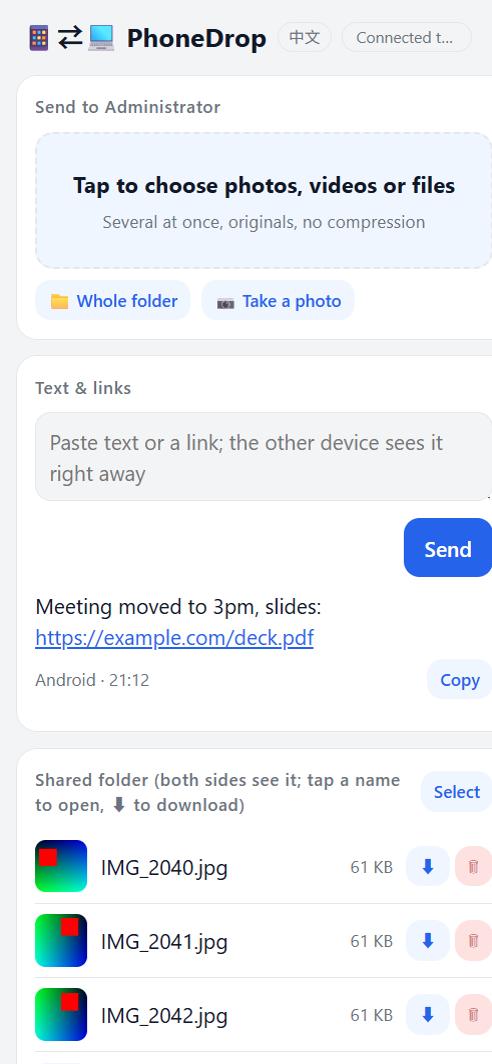
Three steps
- Computer: double-click
PhoneDrop.exe(Mac / Linux:python phonedrop.py). On Windows the first start asks about the firewall: tick “Private networks”, click “Allow access”. - The computer page opens in your browser with a QR code.
- Phone, same Wi-Fi: scan the QR with the camera and the page opens. Add it to the Home Screen and it opens like an app.
What it does
- Pick many photos, videos or files on the phone, a whole folder, or take a photo; originals, no compression, dates kept
- Large videos go in chunks and resume after Wi-Fi drops, screen lock, app switching or a restart
- Files in the computer's shared folder show on the phone: open, save, zip a selection
- Text and links both ways, one-tap copy
- JPEG thumbnails, delete, desktop notifications when files arrive
- Handshake pairing: after scanning the QR the phone must be allowed on the computer; the QR changes every 10 minutes and any paired device can be revoked
- Add to Home Screen → opens like an app
- English and Traditional Chinese, following the phone's language
- Optional start at login: the computer becomes a receiver that is always there
Compared with
| AirDrop | LocalSend | PairDrop | PhoneDrop | |
|---|---|---|---|---|
| iPhone ↔ Windows, Android ↔ Mac | ✗ | ✓ | ✓ | ✓ |
| Install on the phone | — | an app | nothing | nothing |
| Install on the computer | — | an app | nothing | one file |
| Needs a server on the internet | no | no | yes (signaling) | no |
| Files land in a folder, computer can stay running | ✗ | ✓ | ✗ | ✓ |
Security
Local network only, plain HTTP, no accounts, no cloud. Pairing is a handshake: a 10-minute ticket in the QR, explicit approval on the computer, per-device credentials you can revoke; wrong tickets are throttled, the Host header is checked (DNS-rebinding guard), every write needs a custom header (CSRF guard), uploaded HTML never runs in the app's origin. Details and what is deliberately left out: SECURITY.md (shipped with the source).
Other ways to install
# any computer with Python 3.9+ (Windows / macOS / Linux), no packages needed
python phonedrop.py

# once it is on PyPI, also:
pip install phonedrop
The Windows exe is not code-signed: on first run SmartScreen shows a warning, choose “More info → Run anyway”.